ShopDreamUp AI ArtDreamUp
Deviation Actions




![Origami for Rainmeter [1.0]](https://images-wixmp-ed30a86b8c4ca887773594c2.wixmp.com/i/5a4f2ab3-5c38-44e1-80ce-ab2cae87be07/d829qzn-823dfe1e-7f08-444c-9b12-d885be7972cf.png/v1/crop/w_184,h_184,x_23,y_0,scl_0.23,q_70,strp/origami_for_rainmeter__1_0__by_vakinakamura_d829qzn-92s-2x.jpg)
![Origami for Rainmeter [1.0]](https://images-wixmp-ed30a86b8c4ca887773594c2.wixmp.com/i/5a4f2ab3-5c38-44e1-80ce-ab2cae87be07/d829qzn-823dfe1e-7f08-444c-9b12-d885be7972cf.png/v1/crop/w_92,h_92,x_12,y_0,scl_0.115,q_70,strp/origami_for_rainmeter__1_0__by_vakinakamura_d829qzn-92s.jpg)


![Work Launcher [1.3]](https://images-wixmp-ed30a86b8c4ca887773594c2.wixmp.com/i/aa71009e-5bfc-4bb3-9972-43df926509f8/d6y68ou-9d74f3a6-3f58-4b8c-a5a5-b3a332ecf404.jpg/v1/crop/w_184,h_184,x_0,y_43,scl_0.14603174603175,q_70,strp/work_launcher__1_3__by_activecolors_d6y68ou-92s-2x.jpg)
![Work Launcher [1.3]](https://images-wixmp-ed30a86b8c4ca887773594c2.wixmp.com/i/aa71009e-5bfc-4bb3-9972-43df926509f8/d6y68ou-9d74f3a6-3f58-4b8c-a5a5-b3a332ecf404.jpg/v1/crop/w_92,h_92,x_0,y_22,scl_0.073015873015873,q_70,strp/work_launcher__1_3__by_activecolors_d6y68ou-92s.jpg)


Description
@@@Updated 13th April, 2010@@@
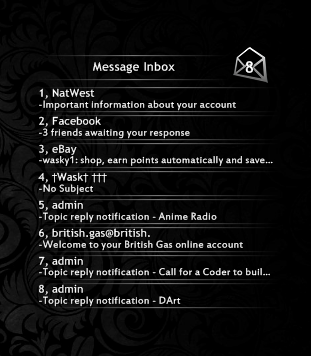
Completely re-Wrote this skin to include some variables, so you can fit to your theme, so if theres any bugs please let me know.
enter your gmail details in the Variables.inc file included in the skin folder(this is where you can edit colors too)
you can drag a small area just to the right of the evelope icon. (it is quite narrow(sorry))
Any questions/criticisms/thaughts please feel free
Completely re-Wrote this skin to include some variables, so you can fit to your theme, so if theres any bugs please let me know.
enter your gmail details in the Variables.inc file included in the skin folder(this is where you can edit colors too)
you can drag a small area just to the right of the evelope icon. (it is quite narrow(sorry))
Any questions/criticisms/thaughts please feel free
© 2010 - 2024 Wasky1
Comments119
Join the community to add your comment. Already a deviant? Log In

First click it shows everything fine, but after closing and clicking again it only shows 1 mail..